What's new in Help+Manual 9?
- Version Control with GIT Support
- Image Styles
- Figure Tables and Figure Links
- PDF Merging
- Support for Premium Pack 5
- And a lot more...
GIT, SubVersion and more
In the past, Help+Manual used the programming interface of version control systems (VCS) to interface with them. This involved a huge amount of development work, which was repeated every time the systems introduced software changes.
The new scripted interface is user-configurable
Help+Manual now uses the editable scripted interface supported by all modern version control systems. Ready-to-use scripts for Git and Subversion are already included. In addition to this, there is a script template called by Help+Manual that you can use to interface with any other system that supports command line access. The scripts for Git and SVN are also fully-editable, allowing you to configure them for your own needs.
For our own documentation, we have internally switched from SubVersion to GIT and use a GitHub repository to synchronize changes from office work and remote work.
With GitHub, BitBucket and other inexpensive or free services, it has become really easy even for small authoring teams to install a setting where you can work and write from any place you want.
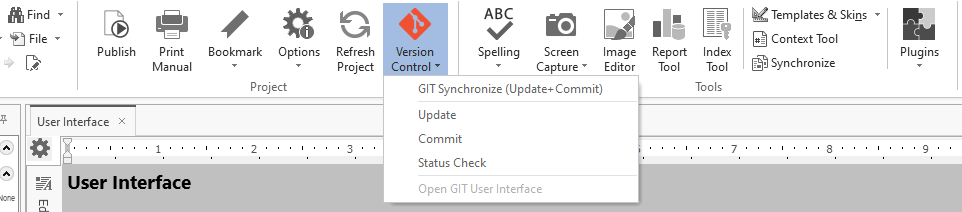
GIT Support in Help+Manual 9
Image Styles
Many users have asked for the ability to apply borders to images globally, or to define the same size for an entire class of images. This is now possible with the new image style introduced in Help+Manual 9.
You can now define styles for images in the same way as for paragraphs and tables. And just as with paragraphs and tables, changing the image style definition changes the formatting for all images tagged with the style.
Image styles let you globally change the size of pictures, add borders, rounded corners and specify an alignment for the image caption. You can apply image styles to regular pictures, toggle images and videos.


Figure Tables and Figure Links
The link tool now includes a dedicated Figure Link option for linking to figures, tables and link captions that have been added to the list of figures. The figure is selected in the same way as an anchor in a topic.
To make the selection of the link target easier, we have implemented a topic preview.

Figure Links with Topic Preview
Alternative positions for Table of Figures
The Table of Figures section in Print Manual Designer can now be exported either before or after the Table of Contents.
Extended chapter numbering options
In Print Manual Designer you now have much more control over how your chapter numbering is formatted, with a range of new options in a separate Chapter Numbering tab in the Page Options dialog of the Topics Section.
Extended support for transparent PNGs
Transparent PNGs can now also be used in Print Manual Designer for both PDF and printed manuals. (They were already supported for PDF in topic pages, but not in Manual Designer).
Merge and Embed PDF Files
In a major new feature, Help+Manual 9 now supports embedding of PDF files, including native embedding in PDF output, both in your project and in your PDF templates. In the past, this was only possible by editing the PDF with external tools after it was generated by Help+Manual.
See PDF Snippets for instructions. This feature is also supported in the Print Manual Designer tool for editing PDF templates.Insert PDFs in your project
You can insert both individual pages from PDF files and entire PDFs as snippets with the new PDF Snippets function. In PDF output the pages are inserted as native PDFs, here too with automatic adjustment of page numbers. In other output formats the PDF pages are converted into images.
Supported PDF types
You can insert any PDF file, not just one created by Help+Manual.

Native PDF Snippets
PDF Peer Review Plugin: Full Comment Roundtrip
The PDF Peer Review Plugin now includes a context menu that allows you to update the comments in your project with comments and annotations added to the PDF by your colleagues.

PDF Peer Review with Comment Roundtripping
DeepL Plugin: Server-side Glossaries
The new API Glossaries in the DeepL machine translation tool radically improves the ability to define your own translations for specific words and phrases. The earlier word list option was local on your computer and couldn't integrate with DeepL's translation on its servers. This meant that your translations weren't included in DeepL's advanced context analysis, often resulting in less meaningful translations.
In contrast, API Glossaries are fully integrated with DeepL, so that the words you define for your translations are included in the contextual analysis, with significantly better results.

DeepL Server-side Glossaries
Markdown Import
Help+Manual now supports importing Markdown files, both for creating new projects and into existing projects. See Creating an empty new project for details.
There are no special settings for Markdown import as it is by definition a very simple format. The Markdown flavor (Daring Fireball or Common Mark) is selected automatically on the basis of the content of the file. A set of standard styles are used to represent the few Markdown formatting options.

Markdown Import in Help+Manual 9
Variables Supported in More Places
You can now use user-defined and HM global variables in the output file name fields for publishing, both in the main Publish screen and in the Publishing Task Manager for batch output. The only restriction is that it must be a global variable defined for the entire project, not a per-topic variable definition.
eWriter configuration: the custom menu for eWriter documentations now supports variables as well.

Publish Dialog with Variables
Webhelp with Google Analytics 4 and updated jQuery
Help+Manual 9 creates Webhelp (HTML + Javascript) with the latest jQuery v3.6.1. This version of jQuery is used for Webhelp output only, HTML Help (.chm) and eWriter are being published with jQuery 2.2.4, because these output formats require compatibility with Microsoft Internet Explorer.
Google Analytics 4
Google has announced that old Universal Analytics accounts (the IDs start with a "UA-xxxx" key) will stop collecting data by June 30, 2023. Starting with July 2023, the new Google Analytics 4 (IDs start with "G-xxxxxxx") will be the only way to use Google Analytics on your web sites.
Help+Manual 9 offers you both variants: with the standard skins delivered with H&M you can keep using the old GA for the time being and switch to GA4 when you are ready. We recommend to make the switch rather sooner than later.
Please note that Premium Pack 5 skins (update below) require the new GA4. The standard skins keep supporting both versions until July 2023.

Google Analytics 4 in Wehhelp
Premium Pack v5 Update
New and updated skins
Premium Pack 5 is a major update with several new skin designs for both WebHelp and eWriter and some powerful new features. It comes with a whole series of modern new skin designs and major overhauls of some of the existing ones.

Premium Pack 5 Cool Max Skins
Keyboard navigation
Two of the new skin series include full keyboard navigation for the entire WebHelp interface. The internal HTML of these skins has also been completely overhauled for improved accessibility.
Google Analytics 4
Version 5 of the Premium Pack switches completely to Google Analytics 4, because Google is ending support for Universal Analytics at the end of June, 2023. The GA4 support includes the ability to respond to the GA opt-out cookie and a GA configuration cookie if you set them from your site-wide user consent form.
Advanced Premium Pack features
The new version also continues to offer all the features that have made the previous versions so popular:
- Toolbox configuration utility with power tools for Help+Manual projects
- Embedded help, email feedback, configurable dropdown menus, topic TOCs
See Templates for more details.
I've been using H+M since HM3 and it's amazing to look back and see how the product has evolved and how much work has gone into it over the years. I hope Help+Manual sells well for you and that EC Software continues to go from strength to strength. Well done!
Martin Wynne, customer since 2003